빠른 답변: GitHub Profile 3D Contrib란?
GitHub Profile 3D Contrib is a GitHub Action that turns a user's contribution calendar into profile-ready 3D images. Instead of opening a separate viewer, the workflow commits generated images to the same repository so your README can display a fresh 3D contribution calendar.
The search intent is different from GitHub City. A visitor looking for github profile 3d contrib usually wants a workflow file, a profile README image path, and a reliable update schedule. A visitor searching for GitHub City usually wants an online visualizer that works without editing a repository.
Use profile-3d-contrib when the final output belongs in a GitHub profile README. Use GitHub City when you want a browser-based 3D city to inspect or share quickly, and use the 3D tool comparison when you are choosing between README images, interactive cities, and printable models.
github profile 3d contrib 의도에서는 README 자동화, GitHub Actions, 생성 파일, 문제 해결이 이 페이지의 범위입니다. 사용자 이름을 입력해 온라인 3D 도시를 보려면 GitHub City를 사용하세요.
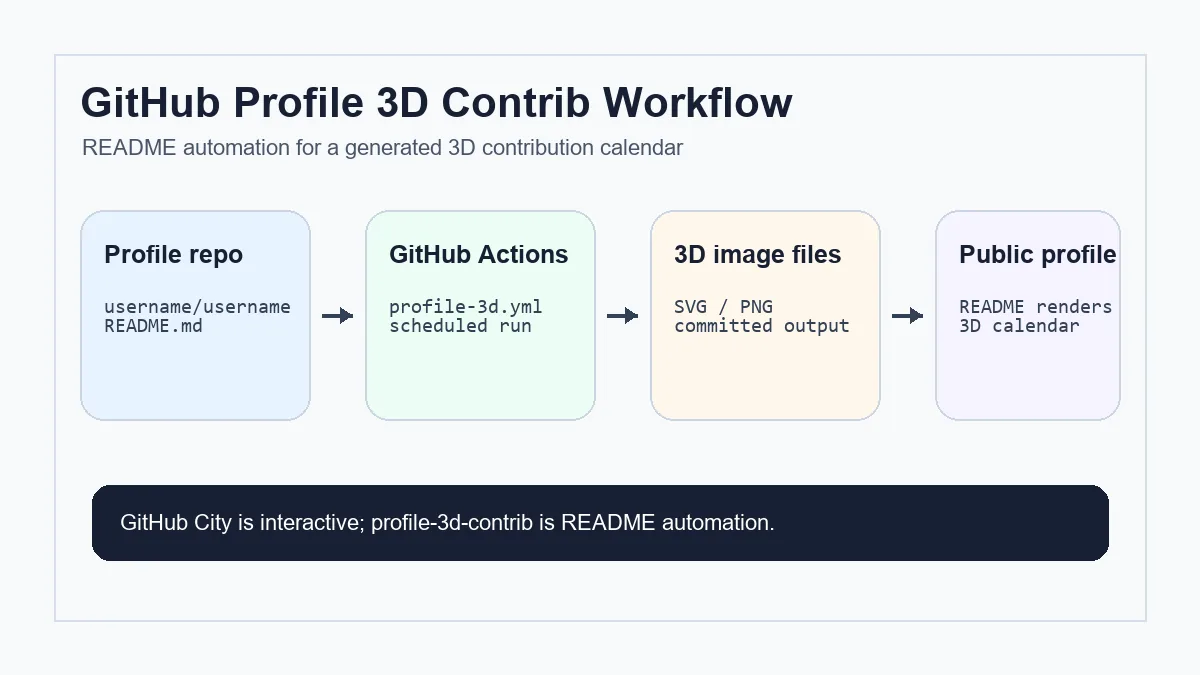
README를 망치지 않고 profile-3d-contrib 설정하기
공식 Action으로 시작하고 이미지가 프로필에 표시되기 전에 GitHub 관련 조건을 확인하세요. 작고 명확하며 수동으로 다시 실행하기 쉬운 설정이 가장 안전합니다.
특수 프로필 repository 만들기
GitHub username과 정확히 같은 이름의 public repository를 만듭니다.
workflow 파일 추가
.github/workflows/profile-3d.yml을 만들고 contents: write, GITHUB_TOKEN, username을 설정합니다.
한 번 수동 실행
첫 실행은 workflow_dispatch로 권한, token, YAML, 파일 누락 오류를 확인합니다.
생성 이미지 삽입
생성된 SVG 또는 PNG 경로를 README.md에 추가하고 branch, folder, 대소문자, 상대 경로를 확인합니다.
private contribution 설정 확인
private contribution은 프로필 설정에서 공개 요약을 허용한 경우에만 반영됩니다.
확인해야 할 workflow 파일과 설정
A reliable profile-3d-contrib setup is small, but it has several moving parts. Treat the workflow, generated image folder, README path, and profile settings as one chain.
If the image updates in the Actions log but not in the README, the issue is usually not the generator. It is more often the committed path, branch, cache, or Markdown reference.
| 파일 또는 설정 | 목적 | 확인할 점 |
|---|---|---|
| README.md | GitHub 프로필에 3D 캘린더를 표시합니다. | 커밋된 이미지와 경로, 대소문자가 일치해야 합니다. |
| .github/workflows/profile-3d.yml | 예약 또는 수동으로 generator를 실행합니다. | 쓰기 권한과 수동 trigger를 포함합니다. |
| 출력 폴더 | 생성된 SVG/PNG 파일을 저장합니다. | workflow 완료 후 파일이 커밋되었는지 확인합니다. |
| 프로필 설정 | private activity의 공개 요약을 제어합니다. | 표시하려는 경우에만 활성화합니다. |
| 워크플로 커밋 단계 | 생성된 SVG 또는 PNG 파일을 프로필 저장소에 다시 기록합니다. | 생성 이미지 파일만 커밋하고 빈 커밋과 캐시 파일 포함을 피하세요. |
profile-3d-contrib vs GitHub City vs GitHub Skyline
These tools all use GitHub contribution data, but they solve different jobs. Do not choose only by the phrase 3D contribution graph.
profile-3d-contrib
프로필 README에 항상 보이는 이미지가 필요할 때 적합합니다. repository 설정과 Actions가 필요합니다.
GitHub City
YAML 없이 브라우저에서 username을 입력해 3D 도시를 즉시 탐색할 때 적합합니다.
GitHub Skyline
README 이미지나 브라우저 city보다 모델형 3D 출력이 필요할 때 적합합니다.
누락되거나 오래된 3D 이미지 문제 해결
If the generated image is missing, first open the latest Actions run. A failed run points to token, permission, YAML, or rate-limit issues. A successful run with no README image points to an output path or Markdown issue.
If the image looks empty, compare it with the official GitHub contribution graph. Contributions that do not appear in GitHub's own calendar generally will not appear in generated 3D images either. For commit-specific causes, use the GitHub commit graph checklist.
If the image is stale, check the scheduled trigger timezone, branch protection, whether the commit step actually pushed files, and whether GitHub is caching the rendered README image.
Actions는 성공했지만 이미지가 바뀌지 않으면 출력 파일 해시, README 이미지 경로, GitHub 또는 브라우저 캐시를 확인하세요.
프로필 전체 구조를 아직 정하는 중이라면 3D 이미지를 넣기 전에 GitHub profile README 템플릿 가이드를 먼저 확인하세요. 생성된 3D 이미지가 아닌 정적 README 위젯은 이 Actions workflow를 바꾸기보다 GitHub streak stats 가이드를 참고하세요.
Do not use a README generator to debug raw Git data
profile-3d-contrib visualizes what GitHub exposes. When contribution counts look wrong, debug email addresses, default branches, private contribution settings, and fork rules before changing the 3D generator.
FAQ
profile-3d-contrib는 GitHub City와 같은가요?
아닙니다. profile-3d-contrib는 Actions로 README 이미지를 만들고, GitHub City는 브라우저용 인터랙티브 visualizer입니다.
GitHub Actions가 필요한가요?
일반 설정에서는 필요합니다. 이미지를 자동으로 다시 만들고 커밋하기 위해 Actions를 사용합니다.
3D 이미지가 비어 있는 이유는?
공식 contribution graph, workflow 권한, token, username, 출력 branch, README 경로를 확인하세요.
private contribution이 표시될 수 있나요?
GitHub가 공개 요약으로 허용한 범위만 반영됩니다.
빠르게 공유하려면 어떤 도구가 좋나요?
인터랙티브 보기에는 GitHub City, README 출력에는 profile-3d-contrib가 적합합니다.
github-profile-3d-contrib는 보통 어떤 파일을 생성하나요?
대부분 SVG 또는 PNG 형식의 3D 기여 캘린더 이미지를 생성해 프로필 저장소 폴더에 저장하고 README.md에서 참조합니다.
YAML을 바꾸기 전에 무엇을 확인해야 하나요?
프로필 저장소 이름, Actions 권한, 출력 폴더, 브랜치, README 경로, 사용자 이름, GitHub 공식 그래프의 활동 표시 여부를 확인하세요.