Quick Answer: What Is GitHub Profile 3D Contrib?
GitHub Profile 3D Contrib is a GitHub Action that turns a user's contribution calendar into profile-ready 3D images. Instead of opening a separate viewer, the workflow commits generated images to the same repository so your README can display a fresh 3D contribution calendar.
The search intent is different from GitHub City. A visitor looking for github profile 3d contrib usually wants a workflow file, a profile README image path, and a reliable update schedule. A visitor searching for GitHub City usually wants an online visualizer that works without editing a repository.
Use profile-3d-contrib when the final output belongs in a GitHub profile README. Use GitHub City when you want a browser-based 3D city to inspect or share quickly, and use the 3D tool comparison when you are choosing between README images, interactive cities, and printable models.
If you arrived from a broad search such as github profile 3d contrib, keep the keyword boundary clear: this page is about README automation, GitHub Actions, generated image files, and troubleshooting. For an online viewer where you simply type a username, use GitHub City instead.
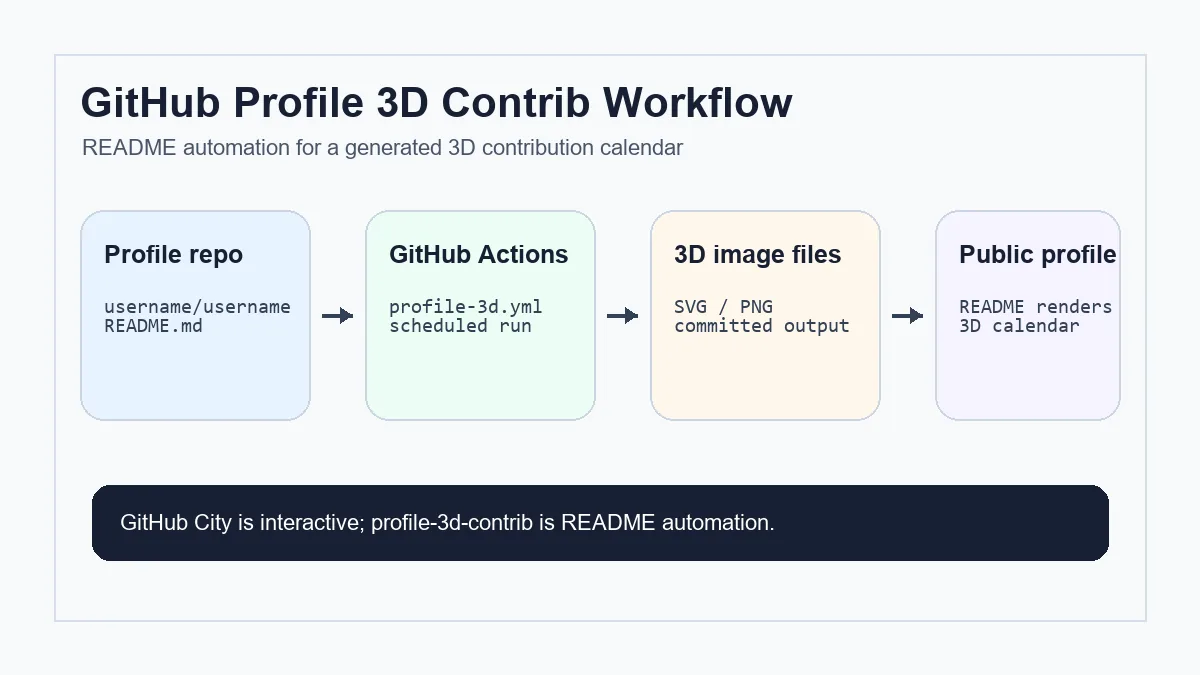
How to Set Up profile-3d-contrib Without Breaking Your README
Start with the official action, then verify each GitHub-specific requirement before you expect the image to appear on your profile. The safest setup is small, explicit, and easy to rerun manually.
Create the special profile repository
Create a public repository whose name exactly matches your GitHub username. GitHub uses that special repository as the source for your profile README.
Add a workflow file
Create .github/workflows/profile-3d.yml, give the workflow contents: write, and use the profile-3d-contrib action with GITHUB_TOKEN and your username.
Run it once manually
Use workflow_dispatch for the first run. A manual run makes permission errors, token errors, or missing repository files visible before you wait for a daily schedule.
Embed the generated image
Add the generated SVG or PNG path to README.md. If the README still shows a broken image, check the branch, generated folder, filename case, and relative path.
Review private contribution settings
Private contributions can appear on the public contribution calendar only when your profile settings allow them. The generated image cannot invent activity that GitHub does not expose.
Workflow Files and Settings to Check
A reliable profile-3d-contrib setup is small, but it has several moving parts. Treat the workflow, generated image folder, README path, and profile settings as one chain.
If the image updates in the Actions log but not in the README, the issue is usually not the generator. It is more often the committed path, branch, cache, or Markdown reference.
| File or setting | Purpose | What to check |
|---|---|---|
| README.md | Displays the generated 3D calendar on your GitHub profile. | Use a path that matches the committed image exactly, including case. |
| .github/workflows/profile-3d.yml | Runs the generator on a schedule or manual trigger. | Include write permission for repository contents and a manual trigger for debugging. |
| profile-3d-contrib output folder | Stores the generated SVG/PNG files. | Confirm files are committed after the workflow completes. |
| Profile contribution settings | Controls whether private contributions can be summarized publicly. | Enable private contribution visibility only if you want that signal included. |
| Workflow commit step | Writes generated SVG or PNG files back to the profile repository. | Commit only generated image files, guard empty commits, and avoid accidentally committing cache files. |
profile-3d-contrib vs GitHub City vs GitHub Skyline
These tools all use GitHub contribution data, but they solve different jobs. Do not choose only by the phrase 3D contribution graph.
profile-3d-contrib
Best for an always-visible GitHub profile README image. It needs repository setup and scheduled Actions, but visitors see the result without opening another site.
GitHub City
Best for instant exploration. Enter a username in the browser and inspect a 3D contribution city without adding workflow files to your profile repository.
GitHub Skyline
Best when you want a contribution-history model or export-oriented 3D shape rather than a README image or browser city.
PNG instead of a workflow
If you only need one fixed image for a post or deck, the GitHub contribution PNG guide is simpler than a recurring workflow.
Troubleshooting Missing or Stale 3D Contribution Images
If the generated image is missing, first open the latest Actions run. A failed run points to token, permission, YAML, or rate-limit issues. A successful run with no README image points to an output path or Markdown issue.
If the image looks empty, compare it with the official GitHub contribution graph. Contributions that do not appear in GitHub's own calendar generally will not appear in generated 3D images either. For commit-specific causes, use the GitHub commit graph checklist.
If the image is stale, check the scheduled trigger timezone, branch protection, whether the commit step actually pushed files, and whether GitHub is caching the rendered README image.
If Actions succeeds but the image does not change, inspect the committed file hash in the output folder and the README image URL. Browser and GitHub CDN caches can make a correct run look stale for a short time.
If you are still planning the whole profile page, use the GitHub profile README template guide before adding a 3D contribution image. For static README widgets that are not generated 3D images, use the GitHub streak stats guide instead of changing this Actions workflow.
Do not use a README generator to debug raw Git data
profile-3d-contrib visualizes what GitHub exposes. When contribution counts look wrong, debug email addresses, default branches, private contribution settings, and fork rules before changing the 3D generator.
FAQ
Is profile-3d-contrib the same as GitHub City?
No. profile-3d-contrib generates images for a profile README through GitHub Actions. GitHub City is an interactive browser visualizer for exploring a 3D contribution city.
Do I need GitHub Actions to use profile-3d-contrib?
Yes, the normal setup uses GitHub Actions so the image can be regenerated and committed automatically.
Why is my 3D contribution image blank?
Check whether the official GitHub contribution graph is also empty, then inspect workflow permissions, token access, username, output branch, and README image path.
Can private contributions appear in the generated image?
Only the public summary that GitHub makes visible can be reflected. Enable private contribution visibility in your profile settings if you want private activity summarized publicly.
Which tool should I use for sharing a quick 3D view?
Use GitHub City for a quick interactive view. Use profile-3d-contrib when the output must live in your README.
What files does github-profile-3d-contrib usually generate?
Most setups generate SVG or PNG contribution calendar images that are committed to a folder in the profile repository and referenced from README.md.
What should I check before changing the workflow YAML?
Check the profile repository name, Actions permissions, output folder, branch, README path, username, and whether the official GitHub contribution graph contains the activity you expect.