Fast Answer: 3D Commits Means Visualizing Counted GitHub Activity
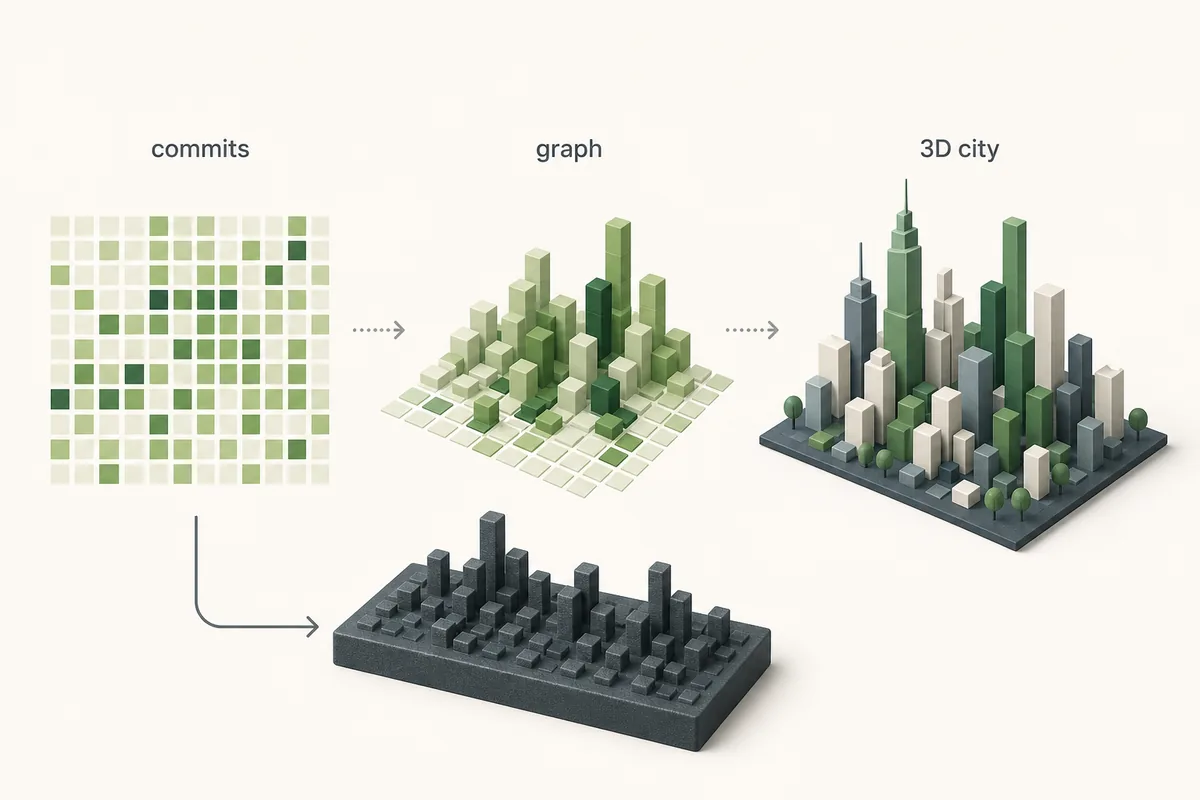
3D commits is not a single official Git command. In search behavior, it usually means turning GitHub commit activity into a 3D output: an online contribution city, a skyline model, a profile README image, or a portfolio graphic. The phrase is useful because it captures the outcome developers want: commits should become visible, spatial, and easier to share.
The key detail is that most browser and model tools do not read every local Git commit directly. They usually depend on GitHub profile contribution data or a tool-specific GitHub API workflow. That means a 3D visual can only be as complete as the source activity it receives. If your official GitHub contribution graph is missing commits, the city or skyline will usually miss them too.
For a fast interactive result, open GitHub City after checking the profile graph. For a printable or exportable artifact, compare GitHub Skyline. For commit attribution problems, use the GitHub commit graph guide before changing tools.
What Data Can Become a 3D Commit Visual?
A useful 3D commit workflow has three layers. The first layer is raw development work: local commits, pull requests, reviews, issues, and repository activity. The second layer is what GitHub counts on a profile contribution graph. The third layer is the visualizer that turns counted activity into height, color, blocks, streets, or a skyline.
These layers explain why two developers can run the same visualizer and get very different results. One profile may have clean commit emails, merged work, public repositories, and private contribution visibility enabled. Another may have local commits that never reached GitHub, work in forks, commits authored with an unlinked email, or private activity hidden from public viewers. The 3D layer cannot repair those gaps.
Use this mental model when choosing keywords and pages too. A page about github commit graph should explain attribution and missing commits. A page about 3D commits should explain how counted activity becomes a visual output and which format fits the user's goal.
3D Commit Output Options Compared
Choose by the final artifact, not by the most impressive screenshot. The same contribution history can be represented as an interactive city, a printable skyline, a README image, or a standard graph.
| Output | Best for | Input reality | Use when |
|---|---|---|---|
| GitHub City | Fast browser exploration and portfolio storytelling | Visible GitHub contribution data | You want to enter a username and inspect a 3D city quickly. |
| GitHub Skyline | Model-oriented or printable contribution artifacts | GitHub contribution history through a local workflow | You need a skyline-style object or export flow. |
| profile-3d-contrib | README images and automated profile decoration | GitHub Actions plus generated image files | The output should live inside a profile README. |
| Official contribution graph | Source-of-truth checks before visualization | GitHub's own counting rules | You need to verify whether activity is counted at all. |
A Practical 3D Commits Workflow
Use this sequence before sharing a 3D commit city, skyline, or README graphic.
Check the official GitHub profile graph
Confirm the year and account first. If the profile graph is sparse, fix the data before judging the 3D output.
Diagnose missing commit data
If commits exist in repositories but not on the profile, check email attribution, branch rules, forks, private visibility, and update delay with the commit graph checklist.
Choose the output format
Use GitHub City for a live browser city, GitHub Skyline for a model workflow, and profile-3d-contrib when the final asset belongs in a README.
Add context when sharing
A 3D city shows visible contribution rhythm. It does not prove code quality, hidden private work, design decisions, reviews outside GitHub, or every local commit.
Link back to the source explanation
When using a 3D visual in a portfolio, include a short note that it reflects visible GitHub contribution data and may omit activity GitHub does not count publicly.
Why a 3D Commit Visual Looks Empty or Misleading
An empty 3D commit visual usually comes from upstream data. Common causes include commits authored with an email address not connected to the GitHub account, work that stayed on a non-counted branch, commits in an unmerged fork, repository visibility limits, private activity hidden from the public graph, or simply choosing a quiet year.
A misleading visual can also come from format expectations. A city may emphasize density and blocks, a skyline may compress weeks into a model, and a README image may flatten activity into a static asset. None of those formats should be treated as complete analytics. They are presentation layers for already-counted activity.
The safest fix is not to regenerate the image repeatedly. First verify the official graph, then decide whether the problem is data counting, privacy, the selected year, or the wrong visual format for your goal.
Practical rule
If the official GitHub contribution graph is wrong, every 3D commit visual should be considered incomplete until the source data is corrected.
3D Commits FAQ
What are 3D commits?
3D commits usually means turning GitHub commit or contribution activity into a 3D visual such as a city, skyline, README image, or printable model.
Can every local Git commit appear in a 3D commit visual?
No. Most GitHub-based 3D visuals depend on visible GitHub contribution data, so local commits, unmatched emails, unmerged forks, and hidden private activity may not appear.
Is GitHub City a 3D commits tool?
GitHub City is best described as a 3D contribution graph tool. It can visualize commit-driven contribution patterns after GitHub counts them on the profile graph.
Should I use GitHub Skyline or GitHub City for 3D commits?
Use GitHub City for a fast browser-based 3D city. Use GitHub Skyline when you need a model-oriented or printable skyline workflow.
Why does my 3D commit city look empty?
Start with the official GitHub contribution graph. If GitHub does not count the activity there, downstream 3D commit visuals will usually look incomplete too.