Kurzantwort: Was ist GitHub Profile 3D Contrib?
GitHub Profile 3D Contrib is a GitHub Action that turns a user's contribution calendar into profile-ready 3D images. Instead of opening a separate viewer, the workflow commits generated images to the same repository so your README can display a fresh 3D contribution calendar.
The search intent is different from GitHub City. A visitor looking for github profile 3d contrib usually wants a workflow file, a profile README image path, and a reliable update schedule. A visitor searching for GitHub City usually wants an online visualizer that works without editing a repository.
Use profile-3d-contrib when the final output belongs in a GitHub profile README. Use GitHub City when you want a browser-based 3D city to inspect or share quickly, and use the 3D tool comparison when you are choosing between README images, interactive cities, and printable models.
Bei github profile 3d contrib geht es hier um README-Automatisierung, GitHub Actions, generierte Dateien und Fehlerbehebung. Fuer eine Online-Stadt mit Benutzernamen nutze GitHub City.
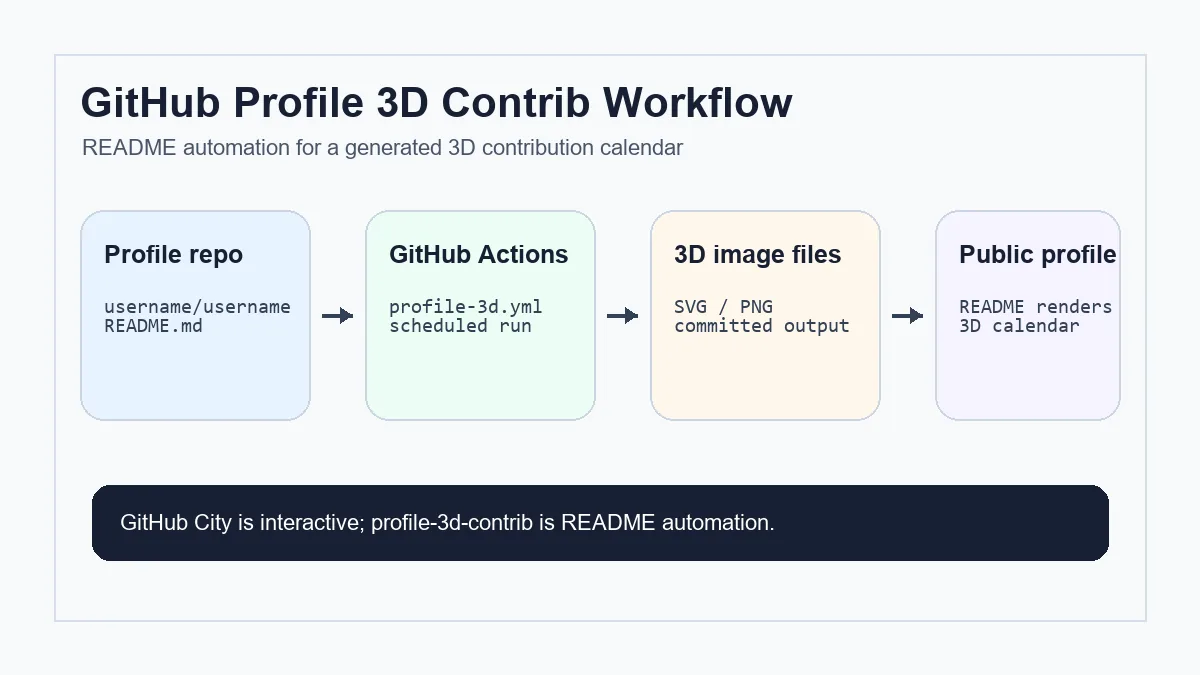
profile-3d-contrib einrichten, ohne das README zu brechen
Starte mit der offiziellen Action und pruefe jeden GitHub-spezifischen Schritt. Eine kleine, explizite Konfiguration laesst sich am besten manuell testen.
Spezielles Profil Repository erstellen
Erstelle ein public Repository, dessen Name exakt deinem GitHub Username entspricht.
Workflow Datei hinzufugen
Lege .github/workflows/profile-3d.yml an, setze contents: write und nutze die Action mit GITHUB_TOKEN.
Einmal manuell starten
Nutze workflow_dispatch, damit Rechte-, Token- oder YAML-Fehler sofort sichtbar werden.
Generiertes Bild einbetten
Fuge den SVG- oder PNG-Pfad in README.md ein und prufe Branch, Ordner, Grossschreibung und relativen Pfad.
Private Contributions prufen
Private Aktivitat kann nur erscheinen, wenn dein Profil die offentliche Zusammenfassung erlaubt.
Workflow Dateien und Einstellungen prufen
A reliable profile-3d-contrib setup is small, but it has several moving parts. Treat the workflow, generated image folder, README path, and profile settings as one chain.
If the image updates in the Actions log but not in the README, the issue is usually not the generator. It is more often the committed path, branch, cache, or Markdown reference.
| Datei oder Einstellung | Zweck | Prufpunkt |
|---|---|---|
| README.md | Zeigt den 3D Kalender im GitHub Profil. | Der Pfad muss exakt zur committeten Datei passen. |
| .github/workflows/profile-3d.yml | Startet den Generator geplant oder manuell. | Schreibrechte und manuellen Trigger vorsehen. |
| Ausgabeordner | Speichert erzeugte SVG/PNG Dateien. | Prufen, ob die Dateien nach dem Lauf committet wurden. |
| Profileinstellungen | Regeln die offentliche Zusammenfassung privater Aktivitat. | Nur aktivieren, wenn diese Anzeige gewunscht ist. |
| Workflow-Commit-Schritt | Schreibt erzeugte SVG- oder PNG-Dateien in das Profil-Repository. | Nur generierte Bilder committen, leere Commits abfangen und Cache-Dateien ignorieren. |
profile-3d-contrib vs GitHub City vs GitHub Skyline
These tools all use GitHub contribution data, but they solve different jobs. Do not choose only by the phrase 3D contribution graph.
profile-3d-contrib
Am besten fur ein dauerhaft sichtbares README Bild. Es braucht Repository Setup und Actions.
GitHub City
Am besten fur sofortige Exploration im Browser ohne YAML oder Profil Repository Anderungen.
GitHub Skyline
Am besten fur modellartige 3D Ausgaben statt README Bild oder Browser Stadt.
Fehlende oder veraltete 3D Bilder beheben
If the generated image is missing, first open the latest Actions run. A failed run points to token, permission, YAML, or rate-limit issues. A successful run with no README image points to an output path or Markdown issue.
If the image looks empty, compare it with the official GitHub contribution graph. Contributions that do not appear in GitHub's own calendar generally will not appear in generated 3D images either. For commit-specific causes, use the GitHub commit graph checklist.
If the image is stale, check the scheduled trigger timezone, branch protection, whether the commit step actually pushed files, and whether GitHub is caching the rendered README image.
Wenn Actions erfolgreich ist, aber README alt wirkt, pruefe Datei-Hash, Bildpfad und moegliche GitHub- oder Browser-Caches.
Wenn du noch das gesamte Profil planst, nutze zuerst den GitHub Profile README Template Guide, bevor du ein 3D-Beitragsbild einfügst. Für statische README-Widgets, die keine generierten 3D-Bilder sind, nutzen Sie den GitHub streak stats Guide statt diesen Actions-Workflow zu ändern.
Nutze keinen README Generator zum Debuggen roher Git Daten
profile-3d-contrib visualizes what GitHub exposes. When contribution counts look wrong, debug email addresses, default branches, private contribution settings, and fork rules before changing the 3D generator.
FAQ
Ist profile-3d-contrib dasselbe wie GitHub City?
Nein. profile-3d-contrib erzeugt README Bilder per Actions; GitHub City ist interaktiv im Browser.
Brauche ich GitHub Actions?
Ja. Der normale Ablauf regeneriert und committet das Bild mit Actions.
Warum ist mein 3D Bild leer?
Prufe den offiziellen Graph, danach Rechte, Token, Username, Ausgabe Branch und README Pfad.
Konnen private Contributions erscheinen?
Nur die von GitHub offentlich freigegebene Zusammenfassung kann erscheinen.
Welches Tool fur schnelles Teilen?
GitHub City fur eine schnelle interaktive Ansicht; profile-3d-contrib fur README Ausgabe.
Welche Dateien erzeugt github-profile-3d-contrib normalerweise?
Meist SVG- oder PNG-Bilder eines 3D-Beitragskalenders, die im Profil-Repository gespeichert und aus README.md referenziert werden.
Was pruefe ich vor YAML-Aenderungen?
Profil-Repository-Name, Actions-Berechtigungen, Ausgabeordner, Branch, README-Pfad, Benutzername und sichtbare GitHub-Aktivitaet.