Resposta rapida: Skyline e para modelo, GitHub City para navegador
GitHub Skyline e um visualizador focado em modelo. Ele converte contribuicoes em uma skyline 3D, enquanto GitHub City prioriza exploracao interativa no navegador.
A diferenca principal e a saida. Skyline faz sentido para objeto, arquivo ou impressao. GitHub City faz sentido quando voce quer digitar um usuario e ver a cidade rapidamente.
Antes de gerar, confira o grafico oficial. E-mail de commit, branch, fork, privacidade e tempo de atualizacao podem esconder atividade.
O caminho seguro e validar os dados, escolher por formato final e usar Skyline apenas quando o modelo exportavel compensar o setup local.
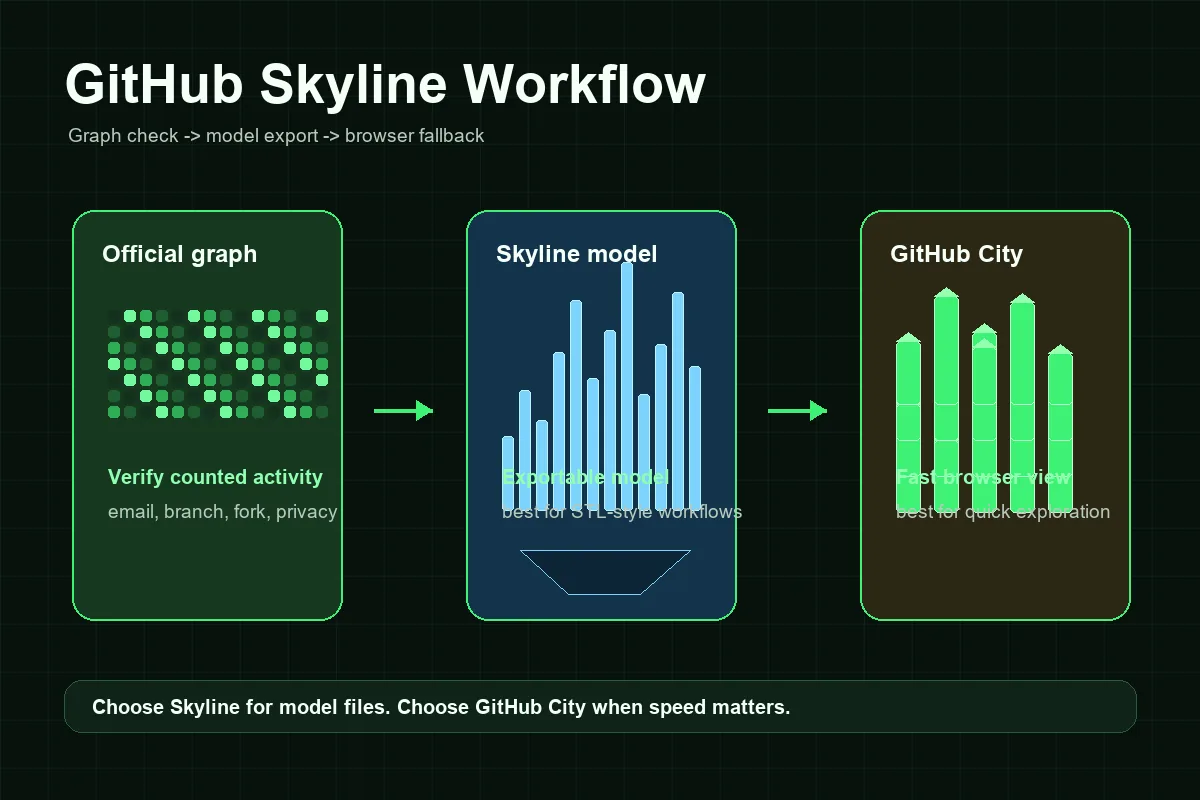
How a GitHub Skyline Workflow Usually Works
A Skyline workflow has more setup than a browser-only visualizer, but the steps are predictable once you separate data checks from model generation.
Confirme o perfil e o gráfico
Comece no perfil público do GitHub. Se o gráfico oficial estiver vazio ou incompleto, corrija isso primeiro.
Prepare o GitHub CLI
GitHub Skyline costuma ser um fluxo de linha de comando, não um formulário web incorporado.
Gere o modelo skyline
Execute o fluxo para a conta e o ano corretos, com autenticação consistente.
Revise antes de imprimir ou compartilhar
Confira se as semanas ativas geram a altura esperada. Se parecer vazio, volte ao gráfico oficial.
Use GitHub City como alternativa rápida
Para captura de portfólio ou exploração rápida, GitHub City costuma ser mais direto.
GitHub Skyline vs GitHub City vs the Official Contribution Graph
Choose by output format. Skyline is model-first, GitHub City is browser-first, and the official graph is the source-of-truth checkpoint.
| Opção | Melhor para | Saída | Esforço | Quando escolher |
|---|---|---|---|---|
| GitHub Skyline | Histórico exportável ou imprimível | Modelo 3D estilo skyline | Médio | Você precisa de modelo, fluxo tipo STL ou geração local. |
| GitHub City | Visualização 3D online rápida | Cidade 3D interativa no navegador | Baixo | Você quer digitar um usuário e explorar rápido. |
| GitCity / CodeCity | Narrativa visual alternativa do perfil | Cena visual compartilhável | Baixo a médio | Você quer outra metáfora de cidade. |
| Gráfico oficial do GitHub | Verificar se a atividade foi contada | Mapa de calor em calendário | Nenhum | Você precisa da base factual antes de um visualizador 3D. |
Troubleshooting: Why a GitHub Skyline Can Look Empty or Wrong
Most Skyline problems start before the model is generated. If GitHub does not count an activity item in the official graph, a skyline export may not include it either. The usual causes are unmatched commit email, activity on a branch GitHub does not count, work left in an unmerged fork, private contribution visibility, repository eligibility, or a short delay before GitHub refreshes profile activity.
The second group of issues is local workflow friction. A command-line visualizer can fail because the CLI extension is not installed, authentication is missing, permissions do not match the target account, or the requested year has little visible activity. Treat those as setup problems rather than SEO or visualization problems.
Finally, remember that a skyline is a visual metaphor. Different tools may map weeks, days, or contribution counts into height differently. A skyline that looks shorter than a city does not always mean the data is wrong; it may simply use a different rendering scale.
Commits ausentes
Confira email, branches contados, forks, visibilidade do repositório e atualização.
Trabalho privado
Contribuições privadas podem ficar ocultas ou anônimas conforme as configurações.
Conta ou ano errado
Confirme usuário e intervalo.
Falha de setup
Confira GitHub CLI, autenticação, extensão e instruções do repositório.
When GitHub Skyline Is Worth Using
Use GitHub Skyline when the final artifact is the point. It is a better fit for 3D printing, physical desk objects, event displays, team retrospectives, and personal developer keepsakes. In those cases, the extra local setup pays off because you can control the generated model instead of relying on a live browser scene.
Use GitHub City when speed and accessibility matter more. A recruiter, teammate, or visitor can open a page, enter a public username, and see a contribution city without installing anything. That makes GitHub City more practical for quick portfolio exploration, while Skyline remains better for model-oriented projects.
A strong portfolio can use both: Skyline for a polished export or printed object, GitHub City for interactive exploration, and the official GitHub contribution graph as the factual baseline. Link them with clear language so viewers understand that all three are different views of contribution history rather than three competing measurements.
Practical rule
If you cannot explain why you need a model file, start with GitHub City. If you need a physical or exportable skyline, use GitHub Skyline after verifying the official contribution graph.
FAQ
What is GitHub Skyline?
GitHub Skyline is a model-oriented way to turn GitHub contribution history into a skyline-style 3D visualization, often discussed with the gh-skyline workflow.
Is GitHub Skyline the same as GitHub City?
No. GitHub Skyline is better for exportable skyline models, while GitHub City is better for quick browser-based 3D city exploration.
Can GitHub Skyline make an STL file?
Skyline searches often focus on STL-style or printable output. Follow the current gh-skyline repository instructions for exact export behavior because project tooling can change.
Why is my GitHub Skyline empty?
First check the official GitHub contribution graph. Missing commit email, branch rules, forks, private visibility, repository eligibility, or the wrong year can make a skyline look empty.
Which is better for a portfolio, GitHub Skyline or GitHub City?
Use GitHub City for a fast interactive visual on the web. Use GitHub Skyline when you want a model, print, or exportable artifact as part of the portfolio story.