What are GitHub Achievements?
The GitHub Achievements list covers official profile badges awarded after qualifying activity. These badges are separate from contribution squares, streak cards, repository badges, and the third-party GitHub Profile Trophy. Open a badge to check its description, earned date, and tier information when available.
The feature is useful as a compact record of collaboration milestones, but it is not a complete measure of developer skill. A merged pull request may be meaningful or trivial; a starred repository may be polished or merely popular. Treat achievements as supporting context beside project explanations, code, documentation, and a clear GitHub profile README.
GitHub currently documents controls for hiding all achievements or individual achievements. Because the feature remains in public preview, use this page as a practical map and verify unusual status changes against GitHub Docs before assuming a badge is permanently gone.
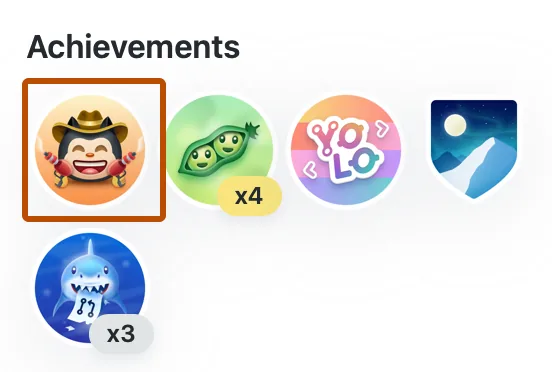
GitHub Achievements list: active, tiered and retired badges
The table combines GitHub's documented profile behavior with the widely used community reference list. Thresholds outside GitHub's own documentation can change, so treat exact community-maintained counts as practical guidance rather than a permanent contract.
Tiered badges add Bronze, Silver, Gold, or higher visual levels after repeated qualifying actions. Retired badges may remain visible for people who earned them earlier, while new users may no longer be able to unlock them.
| Achievement | How it is earned | Tiers | Status |
|---|---|---|---|
| Pull Shark | Have pull requests merged. | Yes; higher levels reflect more merged pull requests. | Active |
| YOLO | Merge a pull request without a code review. | No commonly documented tiers. | Active; do not bypass review just for the badge. |
| Quickdraw | Close an issue or pull request very quickly after opening it. | No commonly documented tiers. | Active |
| Pair Extraordinaire | Coauthor commits that are merged into a pull request. | Yes; repeated qualifying coauthored pull requests increase the tier. | Active |
| Galaxy Brain | Provide answers in GitHub Discussions that are marked as accepted. | Yes; more accepted answers raise the tier. | Active |
| Starstruck | Own a repository that receives enough stars. | Yes; higher star milestones produce higher tiers. | Active |
| Public Sponsor | Publicly sponsor open-source work through GitHub Sponsors. | No standard tier ladder. | Active where Sponsors is available |
| Arctic Code Vault Contributor | Have qualifying code archived in the 2020 GitHub Archive Program snapshot. | No. | Historical; cannot be newly earned |
| Mars 2020 Contributor | Contribute to repositories connected to the Mars 2020 mission program. | No. | Historical/retired |
How to get GitHub Achievements without gaming your profile
Start with work that would still be valuable if the badge did not exist. That keeps your public history useful to maintainers and makes the achievement credible when a recruiter or collaborator opens the underlying repository.
For contribution-based badges, verify that the pull request was merged, the coauthor trailer is valid, or the discussion answer was actually accepted. GitHub may process profile changes asynchronously, so allow time before troubleshooting.
Choose a real collaboration goal
Fix an issue, improve documentation, review a change, answer a discussion, or maintain a useful repository. Do not open disposable pull requests solely to increment a badge.
Meet the qualifying condition
Check the merged state, accepted-answer marker, coauthor metadata, public sponsorship state, or repository ownership. Contribution visibility rules can also affect what appears on your profile.
Inspect the badge detail
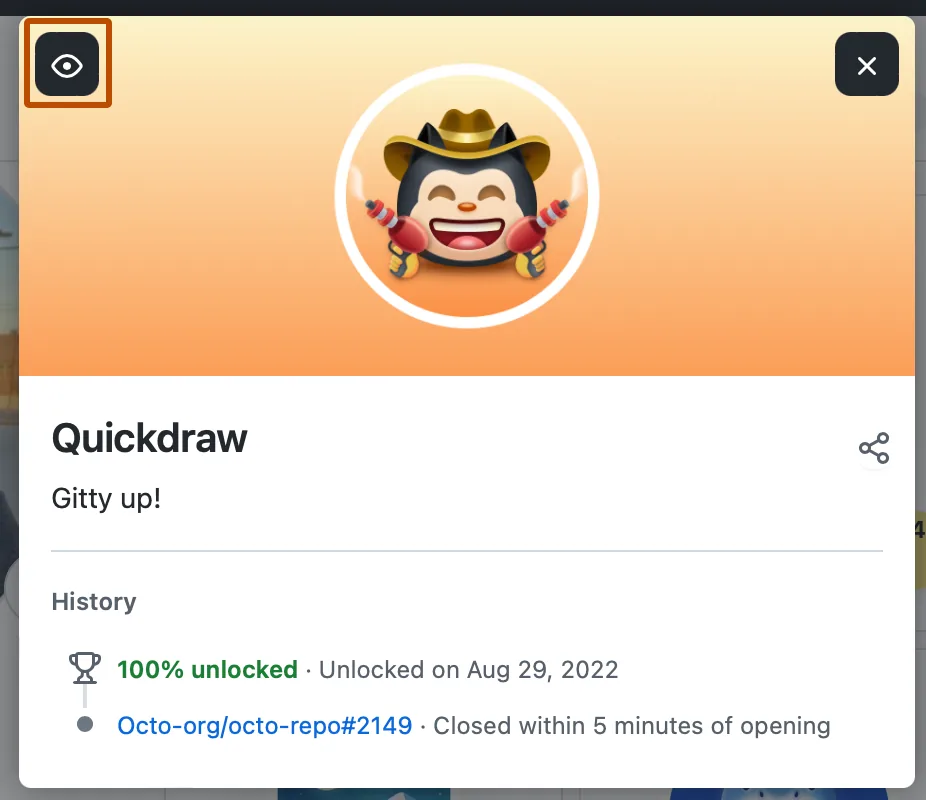
Open the achievement from your profile to review its visible description and tier. A detail page is more reliable than guessing from the badge artwork alone.
Add context instead of a badge wall
Link achievements to projects or explanations in your README. For activity visuals, compare GitHub README Stats, Profile Trophy, and the interactive GitHub City tool.
Why are GitHub Achievements missing or hidden?
First confirm that achievements are enabled in profile settings and that the individual badge is not hidden. GitHub Docs describes both an account-level visibility checkbox and an eye control on each achievement detail view.
A March 27, 2026 GitHub Community thread documented a temporary disappearance of the entire Achievements section for some profiles. That report is a useful reminder to check platform status and community reports before rewriting your README or repeating actions.
The whole section is absent
Open profile settings and verify Show Achievements on my profile. If it is enabled, check another browser session and recent GitHub Community reports.
One badge is missing
Open the badge detail if available and check its eye visibility control. Confirm that the qualifying action reached its final state, such as a merged pull request.
A tier did not increase
Community threshold lists may lag behind product changes. Wait for processing, count only qualifying actions, and avoid treating unofficial thresholds as guaranteed.
Private work is not reflected
Review GitHub's contribution visibility settings. Private contribution summaries and achievement qualification are separate systems, and neither exposes private repository details.
GitHub Achievements vs Trophy, Stats and GitHub City
These visuals answer different questions. Use the smallest set that helps a visitor understand your work, and keep real project links above decorative widgets.
| Option | What it shows | Best use |
|---|---|---|
| GitHub Achievements | Official profile milestones tied to qualifying actions. | Small proof points beside projects and collaboration history. |
| GitHub Profile Trophy | A third-party generated README trophy card. | A configurable visual summary, not an official achievement list. |
| GitHub README Stats | Repository, language, and account statistics cards. | Lightweight README metrics with clear limitations. |
| GitHub City | An interactive 3D view of contribution activity. | Exploring contribution patterns rather than earning badges. |
GitHub Achievements FAQ
How many GitHub Achievements are there?
The count depends on whether you include active, tiered, historical, and retired badges. GitHub does not publish a permanent all-time number, so use the current table and verify changes against GitHub Docs.
Can I see who viewed my GitHub Achievements?
No. Achievements are public profile elements, but GitHub does not provide a viewer list for individual badges or personal profiles.
Can GitHub Achievements be hidden?
Yes. GitHub documents a profile setting for all achievements and an eye control for hiding an individual achievement.
Are GitHub Achievements the same as GitHub Profile Trophy?
No. Achievements are an official GitHub profile feature. GitHub Profile Trophy is a separate third-party image service for README files.
Do private contributions unlock achievements?
Eligibility depends on the specific achievement and GitHub's internal rules. Private contribution visibility does not reveal repository details, and it should not be assumed to guarantee a badge.
Should I farm GitHub Achievements?
No. Spam issues, low-value pull requests, artificial stars, and review bypasses damage the signal the badge is supposed to represent. Earn them through useful work.
Why are my GitHub Achievements not showing?
Check the achievement visibility setting first, then open the badge detail and allow time for a recent qualifying action to appear. If the whole section disappeared after a product change, compare the profile with GitHub's current documentation before assuming the badge was removed.