Reponse rapide : Skyline sert au modele, GitHub City a l exploration web
GitHub Skyline est un visualiseur oriente modele. Il convertit l activite de contribution en skyline 3D plutot qu en simple calendrier ou ville interactive.
La difference principale est la sortie. Skyline convient quand vous voulez un objet, un fichier ou une impression; GitHub City convient quand vous voulez saisir un nom d utilisateur et explorer immediatement une ville 3D.
Avant de generer la skyline, controlez le graphe officiel. Email de commit, branche, fork, confidentialite et delai de mise a jour peuvent expliquer une activite manquante.
Le bon ordre est donc de valider les donnees, choisir l outil selon le format final, puis utiliser Skyline uniquement si le modele exportable justifie la configuration locale.
Le projet officiel gh-skyline présente GitHub Skyline comme une extension GitHub CLI qui génère un fichier STL binaire à partir des contributions. L’installation actuelle utilise gh extension install github/gh-skyline ; consultez le dépôt pour les options et prérequis. Pour comparer les sorties, voyez GitHub City vs GitCity vs GitHub Skyline.
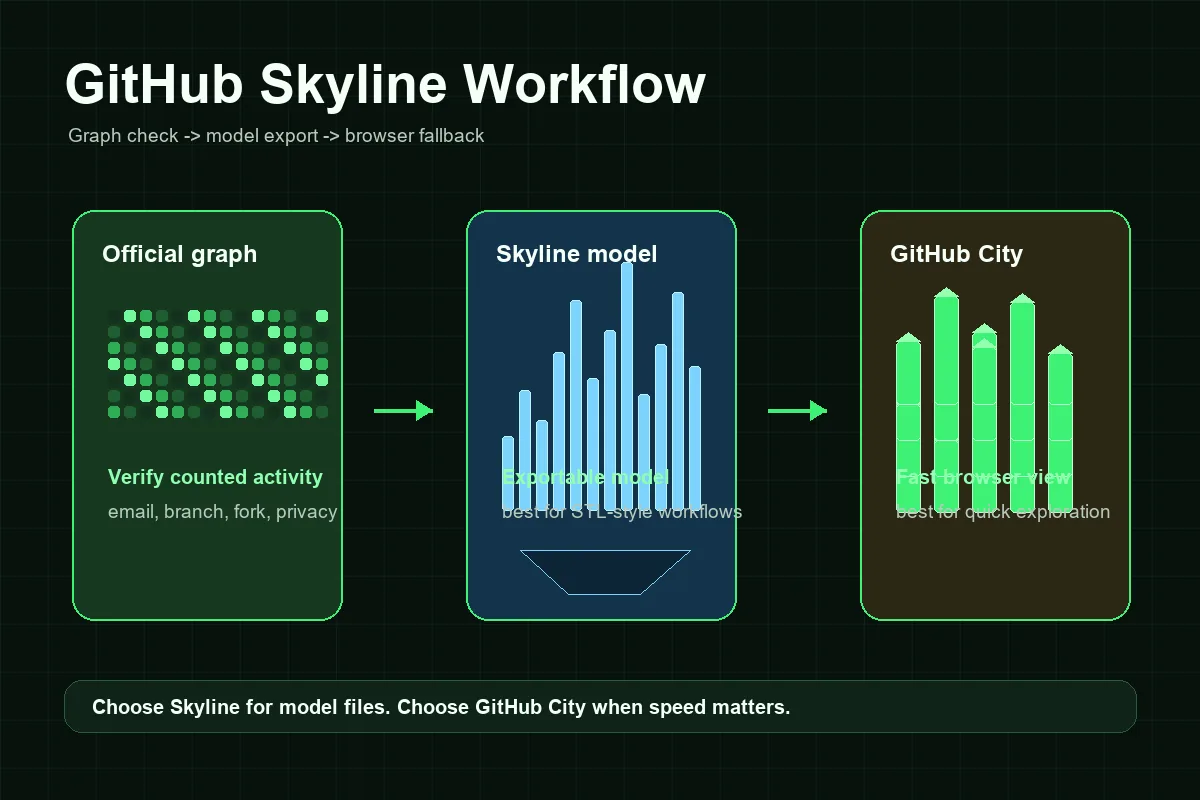
Comment fonctionne un flux GitHub Skyline
Le flux Skyline demande davantage de configuration qu'un visualiseur accessible uniquement dans le navigateur, mais les étapes sont prévisibles si l'on sépare la vérification des données de la génération du modèle.
Confirmer le profil et le graphe
Commencez par le profil public GitHub. Si le graphe officiel est vide ou incomplet, corrigez cela avant d’accuser Skyline.
Préparer GitHub CLI
Installez GitHub CLI, authentifiez-vous avec gh auth, puis installez l’extension avec gh extension install github/gh-skyline. Suivez le dépôt officiel pour les options et prérequis à jour.
Générer le modèle skyline
Lancez le flux pour le compte et l’année voulus, avec une authentification cohérente.
Vérifier avant impression ou partage
Contrôlez si les semaines actives donnent la hauteur attendue. Si le modèle semble vide, revenez au graphe officiel.
Utiliser GitHub City en solution rapide
Pour une capture de portfolio ou une exploration rapide, GitHub City est souvent plus direct.
GitHub Skyline, GitHub City et le graphique officiel des contributions
Choisissez selon le format de sortie : Skyline privilégie le modèle, GitHub City le navigateur et le graphique officiel sert de référence des données.
| Option | Idéal pour | Sortie | Effort | À choisir quand |
|---|---|---|---|---|
| GitHub Skyline | Historique exportable ou imprimable | Modèle 3D de type skyline | Moyen | Vous avez besoin d’un modèle, d’un flux type STL ou d’une génération locale. |
| GitHub City | Visualisation 3D rapide en ligne | Ville 3D interactive dans le navigateur | Faible | Vous voulez saisir un utilisateur et explorer vite le résultat. |
| GitCity / CodeCity | Récit visuel alternatif du profil | Scène visuelle partageable | Faible à moyen | Vous voulez une autre métaphore de ville. |
| Graphe GitHub officiel | Vérifier que l’activité est comptée | Carte calendrier | Aucun | Vous avez besoin de la référence avant tout visualiseur 3D. |
Dépannage : pourquoi un GitHub Skyline peut sembler vide ou incorrect
La plupart des problèmes de Skyline commencent avant la génération du modèle. Si GitHub ne compte pas une activité dans le graphique officiel, elle peut aussi manquer dans l'export. Les causes habituelles sont une adresse e-mail de commit non associée, une branche non comptabilisée, un fork non fusionné, la visibilité des contributions privées, l'éligibilité du dépôt ou un court délai de mise à jour.
Le deuxième groupe de problèmes concerne le flux local. Un visualiseur en ligne de commande peut échouer si l'extension CLI n'est pas installée, si l'authentification manque, si les permissions ne correspondent pas au compte ou si l'année demandée contient peu d'activité visible. Il s'agit de problèmes de configuration, pas de SEO ou de visualisation.
Enfin, rappelez-vous qu'un skyline est une métaphore visuelle. Les outils peuvent convertir les semaines, les jours ou les volumes de contributions en hauteurs différentes. Un skyline plus bas qu'une ville ne signifie pas forcément que les données sont fausses : l'échelle de rendu peut simplement différer.
Commits manquants
Vérifiez email, branches comptées, forks, visibilité du dépôt et délai de mise à jour.
Travail privé
Les contributions privées peuvent être masquées ou anonymisées selon le profil.
Compte ou année erroné
Confirmez le nom d’utilisateur et la période demandée.
Échec de configuration
Vérifiez GitHub CLI, authentification, extension et instructions du dépôt.
Quand utiliser GitHub Skyline
Utilisez GitHub Skyline lorsque l'objet final est le but. Il convient à l'impression 3D, aux objets de bureau, aux événements, aux rétrospectives d'équipe et aux souvenirs de développeur. La configuration locale supplémentaire est utile car elle permet de contrôler le modèle généré plutôt que de dépendre d'une scène en direct dans le navigateur.
Utilisez GitHub City lorsque la rapidité et l'accessibilité comptent davantage. Un recruteur, un collègue ou un visiteur peut ouvrir une page, saisir un nom d'utilisateur public et voir une ville de contributions sans rien installer. GitHub City est donc plus pratique pour explorer un portfolio, tandis que Skyline convient mieux aux projets orientés modèle.
Un portfolio solide peut utiliser les deux : Skyline pour un export soigné ou un objet imprimé, GitHub City pour l'exploration interactive et le graphique officiel GitHub comme base factuelle. Reliez-les avec un texte clair afin de montrer qu'il s'agit de vues différentes de l'historique des contributions, pas de mesures concurrentes.
Règle pratique
Si vous ne pouvez pas expliquer pourquoi vous avez besoin d'un fichier modèle, commencez par GitHub City. Si vous avez besoin d'un skyline physique ou exportable, utilisez GitHub Skyline après avoir vérifié le graphique officiel des contributions.
Questions fréquentes
Qu'est-ce que GitHub Skyline ?
GitHub Skyline est une approche orientée modèle qui transforme l'historique des contributions GitHub en visualisation 3D de type skyline, généralement associée au flux gh-skyline.
GitHub Skyline est-il identique à GitHub City ?
Non. GitHub Skyline convient mieux aux modèles exportables, tandis que GitHub City sert à explorer rapidement une ville 3D dans le navigateur.
GitHub Skyline peut-il créer un fichier STL ?
Les recherches Skyline portent souvent sur une sortie STL ou imprimable. Suivez les instructions actuelles du dépôt gh-skyline pour le comportement exact, car les outils peuvent évoluer.
Pourquoi mon GitHub Skyline est-il vide ?
Vérifiez d'abord le graphique officiel des contributions GitHub. Une adresse e-mail de commit, une branche, un fork, la visibilité privée, l'éligibilité du dépôt ou la mauvaise année peuvent donner un skyline vide.
Que choisir pour un portfolio : GitHub Skyline ou GitHub City ?
Choisissez GitHub City pour un visuel interactif rapide sur le Web. Choisissez GitHub Skyline si vous voulez un modèle, une impression ou un fichier exportable dans votre portfolio.
GitHub Skyline génère-t-il un fichier STL ?
Oui. Le projet officiel github/gh-skyline décrit l’extension comme un outil qui génère un fichier STL binaire à partir des données de contributions GitHub. Consultez le dépôt avant l’installation, car les exigences en ligne de commande peuvent évoluer.