Schnelle Antwort: Skyline fuer Modelle, GitHub City fuer Browser-Erkundung
GitHub Skyline ist ein modellorientierter Visualisierer fuer GitHub-Beitraege. Er macht aus Aktivitaet eine 3D-Skyline statt nur einen Kalender oder eine Browser-Stadt.
Der wichtigste Unterschied ist das Ergebnis. Skyline passt, wenn du ein Objekt, eine Datei oder einen 3D-Druck willst. GitHub City passt, wenn du ohne Installation schnell eine interaktive Stadt oeffnen willst.
Pruefe zuerst den offiziellen Beitragsgraphen. E-Mail, Branch, Fork, private Sichtbarkeit und Aktualisierung koennen erklaeren, warum Aktivitaet fehlt.
Die beste Reihenfolge lautet: Daten pruefen, Ausgabeformat waehlen, Skyline nur verwenden, wenn das exportierbare Modell den lokalen Aufwand rechtfertigt.
Das offizielle gh-skyline-Projekt beschreibt GitHub Skyline als GitHub-CLI-Erweiterung, die aus Beitragsdaten eine binäre STL-Datei erzeugt. Der aktuelle Installationsweg lautet gh extension install github/gh-skyline; nutze die Repository-Anleitung für Flags und Voraussetzungen. Für Ausgabe-Vergleiche hilft GitHub City vs GitCity vs GitHub Skyline.
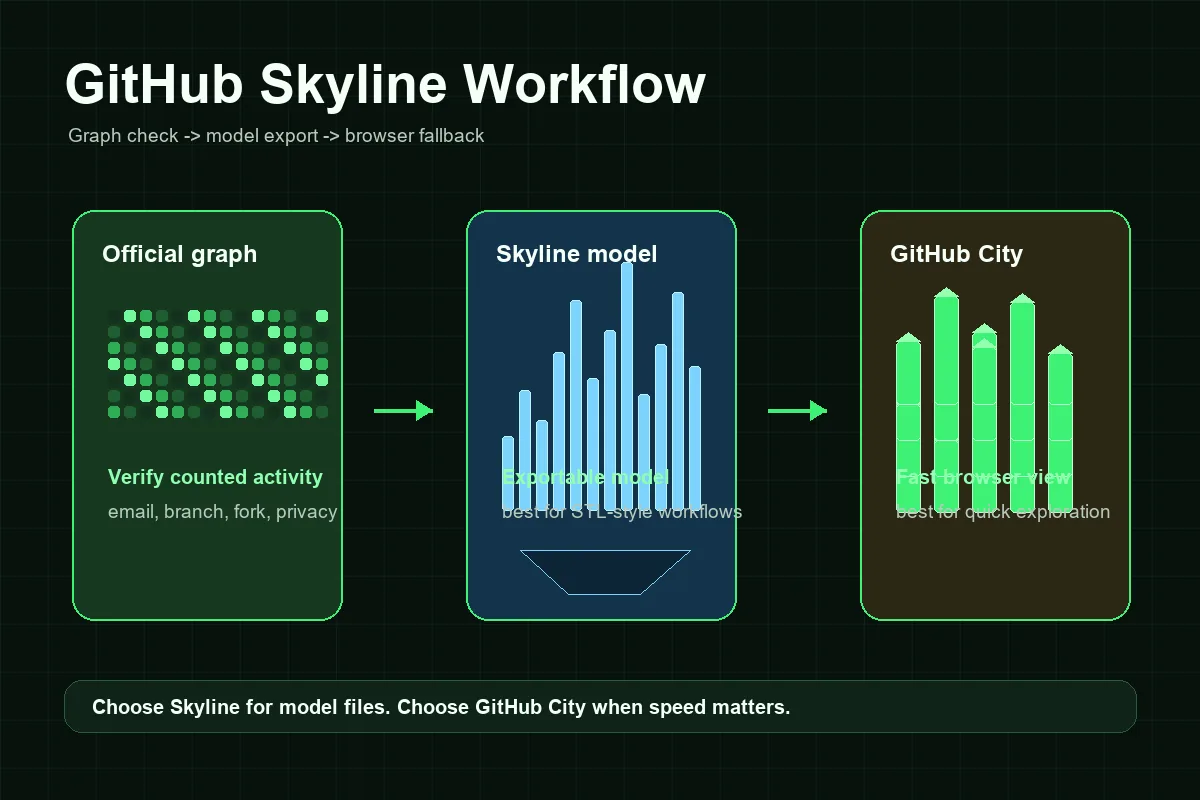
So funktioniert ein GitHub-Skyline-Workflow
Ein Skyline-Workflow braucht mehr Einrichtung als ein reiner Browser-Visualisierer. Die Schritte bleiben jedoch überschaubar, wenn Datenprüfung und Modellerzeugung getrennt werden.
Profil und Graph prüfen
Beginne mit dem öffentlichen GitHub-Profil. Wenn der offizielle Graph leer oder unvollständig ist, behebe das zuerst.
GitHub CLI vorbereiten
Installiere zuerst GitHub CLI, authentifiziere dich mit gh auth und installiere dann mit gh extension install github/gh-skyline. Für aktuelle Flags und Voraussetzungen gilt das offizielle Repository.
Skyline-Modell erzeugen
Erzeuge das Modell für das richtige Konto und Jahr mit konsistenter Authentifizierung.
Vor Druck oder Teilen prüfen
Kontrolliere, ob aktive Wochen die erwartete Höhe ergeben. Bei leerem Modell zurück zum offiziellen Graphen.
GitHub City als schnelle Alternative nutzen
Für Portfolio-Screenshots oder schnelle Erkundung ist GitHub City meist direkter.
GitHub Skyline, GitHub City und der offizielle Beitragsgraph
Wähle nach dem Ausgabeformat: Skyline ist modellorientiert, GitHub City browserorientiert und der offizielle Graph dient als Datenreferenz.
| Option | Am besten für | Ausgabe | Aufwand | Wählen wenn |
|---|---|---|---|---|
| GitHub Skyline | Exportierbare oder druckbare Beitragshistorie | 3D-Skyline-Modell | Mittel | Du brauchst ein Modell, STL-Workflow oder lokale Wiederholbarkeit. |
| GitHub City | Schnelle Online-3D-Visualisierung | Interaktive 3D-Stadt im Browser | Niedrig | Du willst einen Nutzer eingeben und sofort erkunden. |
| GitCity / CodeCity | Alternative visuelle Profil-Erzählung | Teilbare visuelle Szene | Niedrig bis mittel | Du willst eine andere Stadtmetapher. |
| Offizieller GitHub-Graph | Prüfen, ob Aktivität gezählt wurde | Kalender-Heatmap | Keiner | Du brauchst die Basis vor jeder 3D-Visualisierung. |
Fehlerbehebung: Warum ein GitHub Skyline leer oder falsch wirken kann
Die meisten Skyline-Probleme entstehen vor der Modellerzeugung. Wenn GitHub eine Aktivität im offiziellen Graphen nicht zählt, fehlt sie möglicherweise auch im Export. Häufige Ursachen sind eine nicht verknüpfte Commit-E-Mail, ein nicht gezählter Branch, ein nicht zusammengeführter Fork, die Sichtbarkeit privater Beiträge, die Repository-Eignung oder eine kurze Aktualisierungsverzögerung.
Die zweite Problemgruppe betrifft den lokalen Ablauf. Ein Visualisierer auf der Kommandozeile kann scheitern, wenn die CLI-Erweiterung fehlt, die Authentifizierung fehlt, die Berechtigungen nicht zum Konto passen oder das gewünschte Jahr wenig sichtbare Aktivität enthält. Das sind Einrichtungsprobleme, keine SEO- oder Visualisierungsprobleme.
Denke außerdem daran, dass eine Skyline eine visuelle Metapher ist. Tools können Wochen, Tage oder Beitragsmengen unterschiedlich in Höhe umsetzen. Eine niedrigere Skyline als eine Stadt bedeutet daher nicht automatisch falsche Daten; die Darstellungsskala kann abweichen.
Fehlende Commits
Prüfe E-Mail, gezählte Branches, Forks, Sichtbarkeit und Aktualisierung.
Private Arbeit
Private Beiträge können je nach Profil anonymisiert oder verborgen sein.
Falsches Konto oder Jahr
Bestätige Nutzername und Zeitraum.
Setup-Fehler
Prüfe GitHub CLI, Anmeldung, Erweiterung und Repository-Anleitung.
Wann sich GitHub Skyline lohnt
Nutze GitHub Skyline, wenn das fertige Ergebnis im Mittelpunkt steht. Es passt zu 3D-Druck, Objekten für den Schreibtisch, Veranstaltungen, Team-Retrospektiven und persönlichen Erinnerungsstücken. Die zusätzliche lokale Einrichtung lohnt sich, weil du das erzeugte Modell kontrollieren kannst.
Nutze GitHub City, wenn Geschwindigkeit und Zugänglichkeit wichtiger sind. Recruiter, Teammitglieder oder Besucher können eine Seite öffnen, einen öffentlichen Benutzernamen eingeben und ohne Installation eine Beitragsstadt sehen. Für eine schnelle Portfolio-Erkundung ist GitHub City daher praktischer, während Skyline besser zu modellorientierten Projekten passt.
Ein gutes Portfolio kann beide verwenden: Skyline für einen sauberen Export oder ein gedrucktes Objekt, GitHub City für interaktive Erkundung und den offiziellen GitHub-Beitragsgraphen als Faktenbasis. Beschreibe die Links klar, damit die drei Ansichten der Beitragsgeschichte nicht als konkurrierende Messungen missverstanden werden.
Praktische Regel
Wenn du nicht erklären kannst, warum du eine Modelldatei brauchst, beginne mit GitHub City. Wenn du eine physische oder exportierbare Skyline brauchst, nutze GitHub Skyline nach der Prüfung des offiziellen Beitragsgraphen.
Häufige Fragen
Was ist GitHub Skyline?
GitHub Skyline ist eine modellorientierte Möglichkeit, die GitHub-Beitragsgeschichte in eine 3D-Visualisierung im Skyline-Stil umzuwandeln, häufig im Zusammenhang mit dem gh-skyline-Workflow.
Ist GitHub Skyline dasselbe wie GitHub City?
Nein. GitHub Skyline eignet sich besser für exportierbare Modelle, während GitHub City eine schnelle 3D-Stadterkundung im Browser ermöglicht.
Kann GitHub Skyline eine STL-Datei erzeugen?
Bei Skyline geht es in Suchanfragen oft um STL- oder druckbare Ausgaben. Folge den aktuellen Anweisungen des gh-skyline-Repositories, da sich die Tools ändern können.
Warum ist meine GitHub Skyline leer?
Prüfe zuerst den offiziellen GitHub-Beitragsgraphen. Eine falsche Commit-E-Mail, ein Branch, ein Fork, die private Sichtbarkeit, die Repository-Eignung oder das falsche Jahr können die Skyline leer erscheinen lassen.
Was ist für ein Portfolio besser: GitHub Skyline oder GitHub City?
Nutze GitHub City für eine schnelle interaktive Darstellung im Web. Nutze GitHub Skyline, wenn du ein Modell, einen Druck oder eine exportierbare Datei für dein Portfolio brauchst.
Erstellt GitHub Skyline eine STL-Datei?
Ja. Das offizielle Projekt github/gh-skyline beschreibt die Erweiterung als Werkzeug, das aus GitHub-Beitragsdaten eine binäre STL-Datei erzeugt. Prüfe vor der Installation das Repository, da sich Anforderungen an die Kommandozeile ändern können.