빠른 답변: Skyline은 모델용, GitHub City는 브라우저 탐색용
GitHub Skyline은 모델 중심의 GitHub 기여 시각화입니다. 달력 그래프나 브라우저 도시 대신 기여 활동을 3D 스카이라인으로 바꿉니다.
핵심 차이는 출력입니다. Skyline은 파일, 모델, 3D 프린트가 목적일 때 적합합니다. GitHub City는 사용자 이름을 입력하고 바로 3D 도시를 보고 싶을 때 더 빠릅니다.
생성 전에 공식 GitHub 기여 그래프를 확인하세요. 커밋 이메일, 브랜치, 포크, 비공개 설정, 갱신 지연 때문에 활동이 빠질 수 있습니다.
안전한 순서는 데이터 확인, 출력 형식 선택, 모델 파일이 필요할 때만 Skyline 사용입니다.
공식 gh-skyline 프로젝트는 GitHub 기여 데이터로 바이너리 STL 파일을 생성하는 GitHub CLI 확장으로 설명됩니다. 현재 설치 명령은 gh extension install github/gh-skyline이며, 옵션과 사전 조건은 저장소에서 확인하세요. 출력 형식을 비교하려면 GitHub City·GitCity·GitHub Skyline 비교를 참고하세요.
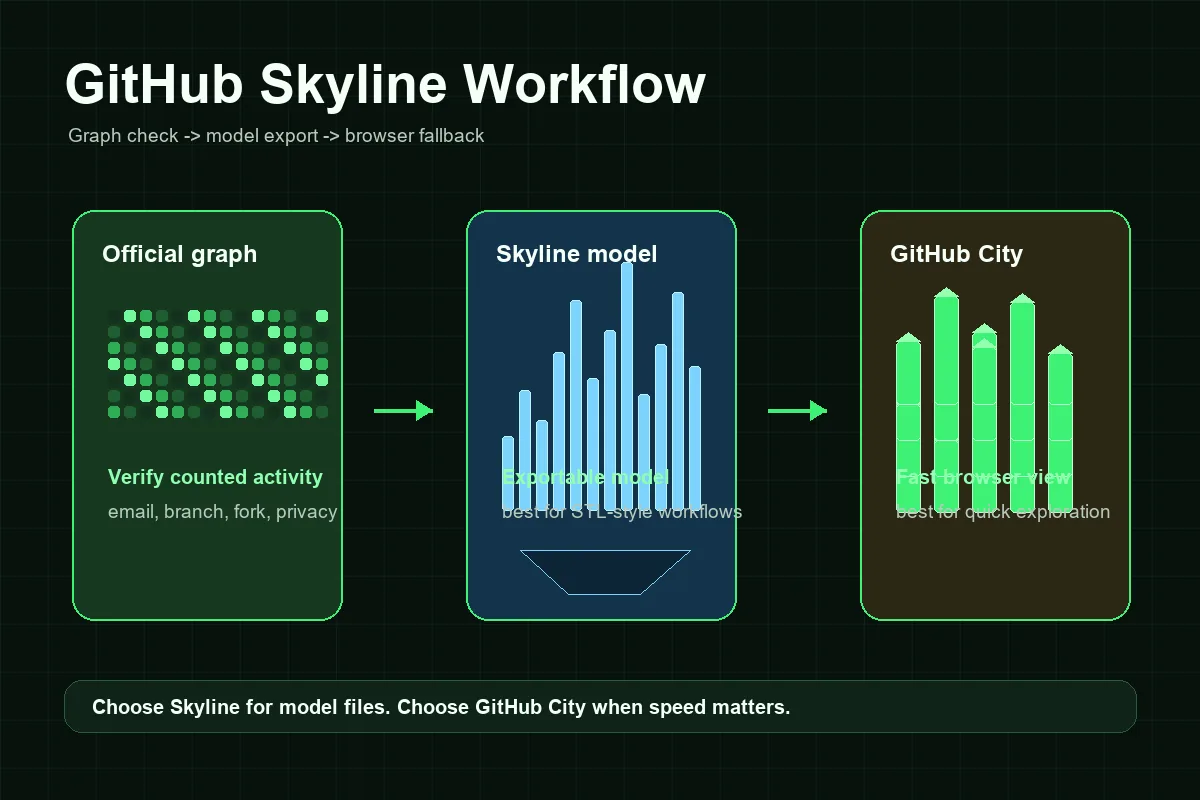
GitHub Skyline 작업 흐름
Skyline은 브라우저만 사용하는 시각화 도구보다 설정이 더 필요하지만, 데이터 확인과 모델 생성을 나누면 단계가 명확합니다.
프로필과 그래프 확인
공개 GitHub 프로필에서 시작하세요. 공식 그래프가 비어 있거나 최근 커밋이 없다면 먼저 원인을 고치세요.
GitHub CLI 준비
GitHub CLI를 설치하고 gh auth로 인증한 뒤 gh extension install github/gh-skyline으로 확장을 설치하세요. 최신 옵션과 사전 조건은 공식 저장소를 확인합니다.
스카이라인 모델 생성
올바른 계정과 연도에 대해 일관된 인증 상태로 모델을 생성하세요.
출력 전 검토
활동이 많은 주가 예상한 높이로 보이는지 확인하세요. 비어 보이면 공식 그래프로 돌아가세요.
빠른 대안으로 GitHub City 사용
포트폴리오 캡처나 빠른 탐색에는 GitHub City가 더 간단합니다.
GitHub Skyline·GitHub City·공식 기여 그래프 비교
출력 형식으로 선택하세요. Skyline은 모델, GitHub City는 브라우저, 공식 그래프는 데이터 기준입니다.
| 옵션 | 적합한 용도 | 출력 | 노력 | 선택할 때 |
|---|---|---|---|---|
| GitHub Skyline | 내보내기 또는 3D 프린트용 기여 기록 | 3D 스카이라인 모델 | 중간 | 모델 파일, STL형 워크플로, 로컬 생성이 필요할 때. |
| GitHub City | 빠른 온라인 3D 시각화 | 브라우저의 인터랙티브 3D 도시 | 낮음 | 사용자 이름을 입력하고 바로 탐색하고 싶을 때. |
| GitCity·CodeCity | 다른 프로필 시각 스토리텔링 | 공유 가능한 시각 장면 | 낮음-중간 | 다른 도시 은유나 표현을 원할 때. |
| 공식 GitHub 기여 그래프 | 활동이 집계됐는지 확인 | 달력 히트맵 | 없음 | 3D 시각화 전 기준 데이터가 필요할 때. |
문제 해결: GitHub Skyline이 비어 보이거나 잘못 보이는 이유
대부분의 Skyline 문제는 모델을 만들기 전에 발생합니다. 공식 그래프에서 GitHub가 활동을 계산하지 않았다면 내보낸 결과에도 포함되지 않을 수 있습니다. 연결되지 않은 커밋 이메일, 계산되지 않는 브랜치, 병합되지 않은 fork, 비공개 기여 설정, 저장소 조건과 갱신 지연을 확인하세요.
두 번째 문제는 로컬 작업 흐름입니다. CLI 확장을 설치하지 않았거나 인증이 없거나 계정 권한이 맞지 않거나 선택한 연도에 보이는 활동이 적으면 명령줄 시각화가 실패할 수 있습니다. 이는 SEO나 시각화 데이터가 아니라 설정 문제입니다.
Skyline은 시각적 비유이기도 합니다. 도구마다 주, 일, 기여 수를 높이로 바꾸는 방식이 다릅니다. 도시보다 낮은 Skyline이 반드시 잘못된 데이터를 뜻하는 것은 아니며 렌더링 배율이 다를 수 있습니다.
누락된 커밋
커밋 이메일, 집계 브랜치, 포크, 저장소 공개 여부, 갱신 시간을 확인하세요.
비공개 작업
비공개 기여는 프로필 설정에 따라 숨겨지거나 익명 처리될 수 있습니다.
잘못된 계정 또는 연도
사용자 이름과 기간을 확인하세요.
설정 실패
GitHub CLI, 인증, 확장 설치, 저장소 안내를 확인하세요.
GitHub Skyline이 유용한 경우
최종 결과물이 중요할 때 GitHub Skyline을 사용하세요. 3D 출력, 책상 위 모형, 행사, 팀 회고, 개발자 기념품에 잘 맞습니다. 로컬 설정을 하면 생성된 모델을 직접 관리할 수 있습니다.
속도와 접근성이 더 중요하면 GitHub City를 사용하세요. 채용 담당자나 동료, 방문자는 페이지를 열고 공개 사용자 이름을 입력하기만 하면 설치 없이 기여 도시를 볼 수 있습니다.
포트폴리오에서는 둘을 함께 사용할 수 있습니다. Skyline은 내보내기·출력용, GitHub City는 상호작용 탐색용, 공식 기여 그래프는 사실 확인용입니다. 세 가지는 서로 다른 기여 기록의 표현이지 경쟁하는 측정값이 아니라는 점을 분명히 하세요.
실용 규칙
모델 파일이 왜 필요한지 설명할 수 없다면 먼저 GitHub City를 사용하세요. 실제 모형이나 내보낼 수 있는 Skyline이 필요하면 공식 기여 그래프를 확인한 뒤 GitHub Skyline을 사용하세요.
자주 묻는 질문
GitHub Skyline이란 무엇인가요?
GitHub Skyline은 GitHub 기여 기록을 Skyline 형태의 3D 시각화로 바꾸는 모델 중심 방식이며, gh-skyline 작업 흐름과 함께 설명됩니다.
GitHub Skyline은 GitHub City와 같은가요?
아니요. GitHub Skyline은 내보낼 수 있는 모델에 적합하고, GitHub City는 브라우저에서 3D 도시를 빠르게 탐색하는 데 적합합니다.
GitHub Skyline은 STL 파일을 만들 수 있나요?
Skyline 검색은 STL 또는 출력 가능한 결과와 관련되는 경우가 많습니다. 정확한 출력 방식은 바뀔 수 있으므로 현재 gh-skyline 저장소의 안내를 확인하세요.
GitHub Skyline이 비어 보이는 이유는 무엇인가요?
먼저 공식 GitHub 기여 그래프를 확인하세요. 커밋 이메일, 브랜치, fork, 비공개 설정, 저장소 조건이나 연도가 맞지 않으면 Skyline이 비어 보일 수 있습니다.
포트폴리오에는 GitHub Skyline과 GitHub City 중 무엇이 더 좋은가요?
웹에서 빠르게 보여주려면 GitHub City, 모델·출력·내보내기가 필요하면 GitHub Skyline을 사용하세요.
GitHub Skyline은 STL 파일을 생성하나요?
예. 공식 github/gh-skyline 프로젝트는 GitHub 기여 데이터에서 바이너리 STL 파일을 생성하는 확장으로 설명합니다. 명령줄 요구 사항이 바뀔 수 있으므로 설치 전에 저장소를 확인하세요.