Risposta rapida: Skyline per modelli, GitHub City per esplorare nel browser
GitHub Skyline e un visualizzatore orientato al modello. Converte i contributi in una skyline 3D, mentre GitHub City privilegia una scena interattiva nel browser.
La differenza e l output. Skyline ha senso per file, oggetti o stampa; GitHub City e migliore per inserire un username e vedere subito una citta 3D.
Prima di generare, verifica il grafico ufficiale. Email del commit, branch, fork, privacy e aggiornamenti possono spiegare attivita mancanti.
Il percorso corretto e validare i dati, scegliere lo strumento per formato finale e usare Skyline solo quando il modello esportabile giustifica il setup locale.
Il progetto ufficiale gh-skyline descrive GitHub Skyline come un’estensione GitHub CLI che genera un file STL binario dai dati dei contributi. L’installazione attuale usa gh extension install github/gh-skyline; controlla il repository per opzioni e requisiti. Per confrontare gli output, vedi GitHub City vs GitCity vs GitHub Skyline.
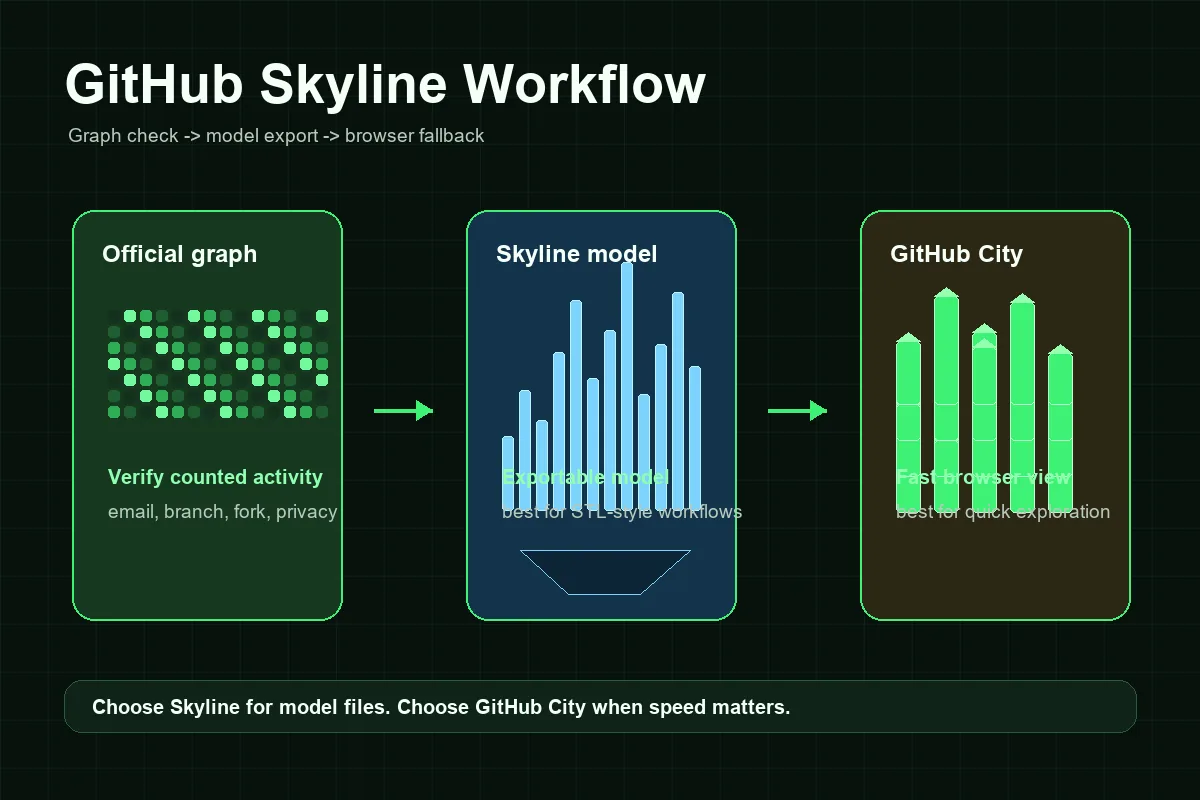
Come funziona un flusso GitHub Skyline
Il flusso Skyline richiede più configurazione di un visualizzatore solo browser, ma i passaggi sono prevedibili quando separi il controllo dei dati dalla generazione del modello.
Conferma profilo e grafico
Parti dal profilo GitHub pubblico. Se il grafico ufficiale è vuoto o incompleto, correggi prima quello.
Prepara GitHub CLI
Installa GitHub CLI, autenticati con gh auth e installa l’estensione con gh extension install github/gh-skyline. Segui il repository ufficiale per opzioni e requisiti aggiornati.
Genera il modello skyline
Esegui il flusso per account e anno corretti, con autenticazione coerente.
Controlla prima di stampare o condividere
Verifica se le settimane attive producono l’altezza prevista. Se sembra vuoto, torna al grafico ufficiale.
Usa GitHub City come alternativa rapida
Per screenshot di portfolio o esplorazione veloce, GitHub City è spesso più diretto.
GitHub Skyline, GitHub City e il grafico ufficiale dei contributi
Scegli in base al formato di output: Skyline privilegia il modello, GitHub City il browser e il grafico ufficiale è il riferimento dei dati.
| Opzione | Ideale per | Output | Impegno | Quando scegliere |
|---|---|---|---|---|
| GitHub Skyline | Storico esportabile o stampabile | Modello 3D tipo skyline | Medio | Ti serve un modello, un flusso tipo STL o generazione locale. |
| GitHub City | Visualizzazione 3D online rapida | Città 3D interattiva nel browser | Basso | Vuoi inserire un utente ed esplorare subito. |
| GitCity / CodeCity | Narrazione visiva alternativa del profilo | Scena visiva condivisibile | Basso a medio | Vuoi un’altra metafora di città. |
| Grafico GitHub ufficiale | Verificare se l’attività è contata | Heatmap calendario | Nessuno | Ti serve la base prima di un visualizzatore 3D. |
Risoluzione dei problemi: perché un GitHub Skyline può sembrare vuoto o errato
La maggior parte dei problemi di Skyline nasce prima della generazione del modello. Se GitHub non conta un'attività nel grafico ufficiale, potrebbe non comparire nemmeno nell'esportazione. Le cause comuni sono un'e-mail di commit non associata, un branch non conteggiato, un fork non unito, la visibilità dei contributi privati, l'idoneità del repository o un breve ritardo di aggiornamento.
Il secondo gruppo di problemi riguarda il flusso locale. Un visualizzatore da riga di comando può fallire se l'estensione CLI non è installata, manca l'autenticazione, i permessi non corrispondono all'account o l'anno richiesto contiene poca attività visibile. Sono problemi di configurazione, non di SEO o visualizzazione.
Infine, ricorda che uno skyline è una metafora visiva. Strumenti diversi possono trasformare settimane, giorni o quantità di contributi in altezze diverse. Uno skyline più basso di una città non significa necessariamente che i dati siano errati: può usare una scala di rendering diversa.
Commit mancanti
Controlla email, branch contati, fork, visibilità e tempi di aggiornamento.
Lavoro privato
Le contribuzioni private possono essere nascoste o anonimizzate.
Account o anno errato
Conferma username e intervallo.
Errore di setup
Controlla GitHub CLI, autenticazione, estensione e istruzioni.
Quando vale la pena usare GitHub Skyline
Usa GitHub Skyline quando il risultato finale è l'obiettivo. È adatto alla stampa 3D, agli oggetti da scrivania, agli eventi, alle retrospettive di team e ai ricordi personali da sviluppatore. La configurazione locale aggiuntiva conviene perché puoi controllare il modello generato.
Usa GitHub City quando velocità e accessibilità contano di più. Un recruiter, un collega o un visitatore può aprire una pagina, inserire un nome utente pubblico e vedere una città di contributi senza installare nulla. GitHub City è quindi più pratico per esplorare rapidamente un portfolio, mentre Skyline è migliore per progetti orientati al modello.
Un buon portfolio può usare entrambi: Skyline per un'esportazione curata o un oggetto stampato, GitHub City per l'esplorazione interattiva e il grafico ufficiale GitHub come base fattuale. Usa descrizioni chiare per mostrare che sono viste diverse della cronologia dei contributi, non misurazioni concorrenti.
Regola pratica
Se non sai spiegare perché ti serve un file modello, inizia con GitHub City. Se ti serve uno skyline fisico o esportabile, usa GitHub Skyline dopo aver verificato il grafico ufficiale dei contributi.
Domande frequenti
Che cos'è GitHub Skyline?
GitHub Skyline è un modo orientato al modello per trasformare la cronologia dei contributi GitHub in una visualizzazione 3D a forma di skyline, spesso associata al flusso gh-skyline.
GitHub Skyline è uguale a GitHub City?
No. GitHub Skyline è più adatto ai modelli esportabili, mentre GitHub City serve per esplorare rapidamente una città 3D nel browser.
GitHub Skyline può creare un file STL?
Le ricerche su Skyline riguardano spesso output STL o stampabili. Segui le istruzioni aggiornate del repository gh-skyline per il comportamento esatto, perché gli strumenti possono cambiare.
Perché il mio GitHub Skyline è vuoto?
Controlla prima il grafico ufficiale dei contributi GitHub. E-mail del commit, branch, fork, visibilità privata, idoneità del repository o anno errati possono far sembrare vuoto lo skyline.
Cosa è meglio per un portfolio: GitHub Skyline o GitHub City?
Usa GitHub City per una visualizzazione interattiva rapida sul Web. Usa GitHub Skyline quando vuoi un modello, una stampa o un file esportabile nel portfolio.
GitHub Skyline genera un file STL?
Sì. Il progetto ufficiale github/gh-skyline descrive l'estensione come uno strumento che genera un file STL binario dai dati dei contributi GitHub. Controlla il repository prima dell'installazione perché i requisiti da riga di comando possono cambiare.